

All you need is context

If you've ever seen the film Memento, you know the profound confusion of its protagonist, Leonard Shelby. Due to a brain injury, he's unable to form new long-term memories. Each moment is a fresh start, and he must rely on a system of tattoos, polaroid photos, and scribbled notes to understand the "context" of his own life. Without it, he's lost.
Your AI coding assistant-whether it's Claude, Cursor, Windsurf or another tool-is a lot like Leonard. Initially it has no memory of your project's history, your ultimate goal, or the subtle nuances of your codebase. It processes only the immediate information you provide. Forget to give it the right "note," and the code it generates might be technically correct but functionally useless, or even harmful.
Don't Believe His Lies

The Scene: Leonard has a polaroid of Teddy. On the back, his own handwriting warns, "Don't believe his lies." This note is the entire context Leonard has for his relationship with Teddy. He follows its instruction without question, leading to the film's climax. He doesn't remember why he wrote it or the complex events that led to that instruction. He just has the note.
The AI Parallel: The Out-of-Date Comment
This is what happens when you give an AI partial or outdated context. The AI will trust the "note" you give it, even if it's no longer relevant.
Coding Example: Imagine you're asking an AI to refactor a function in a legacy system.
Your Prompt (The "Note"):
"Can you refactor this JavaScript function to use async/await?"
// Deprecated: We now use the `useUser` hook.function getUser(userId, callback) {$.ajax({url: `/api/users/${userId}`,method: 'GET',success: function(userData) {callback(userData);},error: function(error) {callback(null, error);},});}
Response you didn't want:
The AI will refactor the function you provided, missing the crucial comment because you didn't explicitly tell it to look at it.
// Deprecated: We now use the `useUser` hook.async function getUser(userId) {try {const response = await fetch(`/api/users/${userId}`);if (!response.ok) {throw new Error(`HTTP error! status: ${response.status}`);}const userData = await response.json();return userData;} catch (error) {throw error;}}
How to Provide Better Context: A better prompt would be:
"I'm updating my user data functions. The comment says we should use the useUser hook now. Can you rewrite this old getUser function to be an async function that uses the new hook?"
This is like Leonard finding another note that says, "Teddy note is from last week. New target." It changes everything.
Also note that the AI is much better at gathering context by itself when given some directive - had I not asked to use the new hook, it wouldn't have looked for it (and found the "use-auth" hook, which is what we actually wanted).
How to document well
You may also have experienced AI coding assistants writing documentation for you - this is sometimes useful, but ONLY when it is written in a certain manner, AND kept up to date.
Be mindful of writing mainly about the WHY, not so much the HOW, and use POSITIVE language without prescribing architecture (it belongs elsewhere). For example:
## Fetching usersThe useUser functionality exists so that we can load all the user data from the /users collection, given a `uid`.* It is async so that it doesn't block loading other data* We should always use `useUsers` when loading user data
Is good, but if you include implementation details and negative language, such as:
## Fetching usersThe useUser hook loads all the user's data from the /users collection, and we filter on the `uid` parameter* We use hooks so that it is async so that it doesn't block loading other data* Never fetch data directly using the SDK, always use functions
You are prescribing architectural decisions (using hooks) - this is better placed in the general prompt information, eg: claude.md or agents.md
You have added a negative part to the prompt, which could as easily have been framed in a positive manner (LLMs find it much easier to follow positive language).
Added potential confusion, eg: "always use functions" can actually mean something very different in certain frameworks, (eg: Firebase functions), and lead to real problems.
I suggest you store implementation details somewhere other than in the main claude.md or agents.md file - a separate /docs directory, and then @-mention the file when you need it in context is a good idea. You can also setup an MCP server that Claude code can use to pull things in when it needs to, and go full out with multiple MCP integrations.
Documenting for the AI assistants - best practice
Here are the 5 most important things for a agents.md or claude.md file:
1. Unique Architectural Decisions (WHY > HOW)
Focus on why you made non-standard choices, not how standard frameworks work.
- Bad: "Uses React for UI"
- Good: "Port 9002 instead of 3000 to avoid conflicts with other local services"
- Good: "Markdown in /posts/ rather than CMS because content is technical and version-controlled"
2. Non-obvious Entry Points & Flow
Where should someone start when they need to understand/modify something?
- Good: "Authentication flow: src/auth/provider.tsx → middleware.ts → route protection"
- Good: "Data fetching: Server components in app/ → API routes → external services"
3. Project-Specific Conventions
Things that aren't standard but matter for consistency.
- Good: "All API responses use { data, error } wrapper format"
- Good: "Components prefixed with App are layout-level, others are reusable"
4. Critical Context & Constraints
Business/technical context that affects code decisions.
- Good: "Must support IE11 (corporate requirement) - affects bundle size choices"
- Good: "Optimized for mobile-first usage patterns in emerging markets"
5. Development Gotchas & Setup
Things that will bite new developers.
- Good: "Run npm run db:seed before first dev server start"
- Good: "Hot reload breaks on route changes - restart dev server"
Writing Principles:
- WHY > HOW > WHAT - WHY: "We use Redis because PostgreSQL was too slow for real-time features"; HOW: "Redis connection pooling via ioredis"; WHAT: "Uses Redis" ← least valuable
- Be Ruthlessly Specific - Bad: "Uses modern React patterns"; Good: "Server Components for data fetching, Client Components only for interactivity"
- Optimize for "I need to change X" - Think about common tasks: "I need to add a new API endpoint" → where & how; "I need to change the auth flow" → which files, what order; "I need to debug slow pages" → monitoring setup, common bottlenecks
- Avoid Documentation Debt - No version numbers (they get stale); No obvious descriptions; No duplicating what's in package.json/README
The best agents.md or claude.md files read like "insider knowledge" - things you'd tell a new teammate over coffee, not what they could figure out from reading the code.
The "Facts"
The Scene: Leonard's body is a canvas of "facts" that he has deemed permanent and unchangeable. These tattoos form the core principles of his investigation. He trusts them implicitly because they are, quite literally, a part of him. However, we learn that these "facts" might be based on incomplete or misinterpreted information.

The AI Parallel: The System-Wide Assumption
This is like giving the AI a piece of information about your entire project and expecting it to remember it for every subsequent request. You might set up a project structure, a specific design pattern, or a database schema.
Coding Example: Let's say you're building a React application and you've decided to use a global state management pattern where user data is always accessed via a useUser() hook.
Your Prompt (The Implied "Fact"): (After previously establishing the useUser hook)
"Create a new React component called UserProfile that displays the user's name and email."
The AI's Potential (Context-less) Response: Without being reminded of the project's architecture, the AI might fall back on a generic pattern, like passing user data down as props.
// The AI doesn't know about your global state "fact"function UserProfile({ user }) {if (!user) return <div>Loading...</div>;return (<div><h1>{user.name}</h1><p>{user.email}</p></div>);}
This code works in isolation but completely violates your application's architecture.
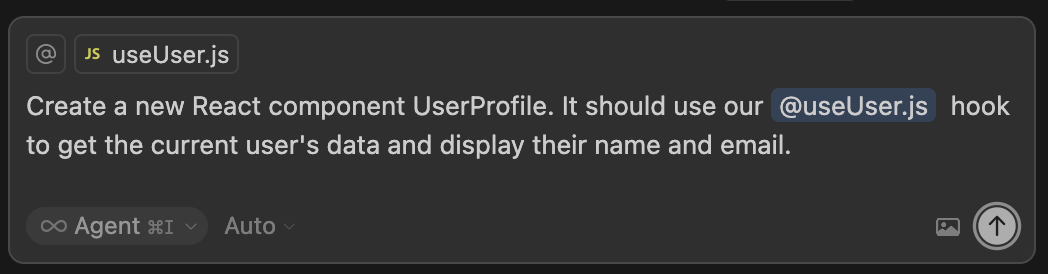
How to Provide Better Context (Using Cursor or similar tools): In a tool like Cursor, you can "attach" the file defining your useUser hook to the chat (@/hooks/useUser.ts). This makes the AI aware of the project-specific "fact."
A Better Prompt:
"Create a new React component UserProfile. It should use our @useUser.ts hook to get the current user's data and display their name and email."
The Blank Polaroid
The Scene: A fresh polaroid slides out of the camera. It's a blank slate, a moment with no context. Leonard has to furiously scribble a note on it before the memory of why he took the picture vanishes. What is this place? Who is this person? The photo itself isn't enough.

The AI Parallel: The Single File Problem
This is the most common mistake: dropping a single file into an AI chat and asking for a complex change. The AI sees the file, but it has no idea where it fits. Does it have dependencies? Is it a utility function? Is it a critical component?
Coding Example: You have a utility file with a formatting function.
export const formatCurrency = (amount) => {return new Intl.NumberFormat('en-US', {style: 'currency',currency: 'USD',}).format(amount);};
Your Prompt (The "Blank Polaroid"):
"Change this function to handle Australian dollars (AUD)."
The AI's Simple (and Potentially Dangerous) Response: It will change 'USD' to 'AUD' in that one file.
export const formatCurrency = (amount) => {return new Intl.NumberFormat('en-AU', {style: 'currency',currency: 'AUD',}).format(amount);};
What the AI doesn't know is that this function is imported by 27 other components, some of which are related to US-based payment processing and will now break silently, causing major bugs.
How to Provide Better Context: Before making the request, you need to "write on the polaroid." Use your IDE or a command like grep to find where formatCurrency is used.
A Better Prompt:
"I need to add support for Australian currency. I have this formatCurrency function in utils/formatters.ts. It's currently hard-coded for USD."
The Hotel Room Murder Board
The Scene: Leonard's hotel room wall is famously covered with photos, maps, and notes, all connected by threads. It's his external, persistent "brain." It allows him to see the relationships between different pieces of information all at once. This is his high-level guide to the entire investigation.

The AI Parallel: Defining Architecture with claude.md, agents.md, et al
This is where you define the "rules of the world" for your AI. Many tools allow for a project-level instruction file (like claude.md, .cursor, or a custom prompt library). This file is your murder board-it tells the AI the core architectural principles, preferred libraries, and coding styles it must always follow for this specific project.
Project Architectural Guidelines
Coding Example: Imagine you create a claude.md file at the root of your project with these rules:
- Language: We use Typescript
- Display framework: We use React
- State Management: Always use Zustand for global state. Do not use React Context or Redux. Create a new store for each major feature.
- Data fetching: All data fetching is done in hooks that use the Firebase SDK to query and retrieve data
- Data modelling: We use Zod to define data schemas for data validation, ensuring data integrity and type safety at both compile-time and runtime.
- Styling: Use TailwindCSS classes for all styling. Do not write custom CSS files.
- Component Naming: All React components must be PascalCase and be in their own folder.
You might also have instructions on how to run tests, common commands to run the project and architectural peculiarities that are worth being aware of, and you can even import other files that are relevant with @file.md, so you can keep separated concerns in other files.
Now, when you make a simple request, you don't need to specify these details every time.
Notes:
- Claude code will add everything to the context from
claude.md, so it's best to keep it lean - even "@file.md" mentions are loaded when a new session is started. - A common mistake is adding extensive content without iterating on its effectiveness. Take time to experiment and determine what produces the best instruction following from the model.
Your Prompt:
"Create a feature to fetch and display a list of user notifications."
Because the AI has internalized the "murder board" context from claude.md, it won't just write any code, it will write the right code for your project:
- It will create a new Zustand store in src/stores/notificationStore.ts.
- It will create a new
useNotificationshook in src/hooks/useNotifications.ts that uses the firebase SDK - Inside the store, it will import and use the
useNotificationshook to fetch the data. - It will create a src/components/NotificationList/index.tsx component.
- The component will use the Zustand store to get the data and render it using TailwindCSS classes.
You didn't have to specify any of that. The AI followed the rules you left for it, just as Leonard follows the "facts" on his wall.
Putting it all together
The Scene: At the climax of the film, Leonard makes a profound, reality-altering decision. He does this by combining everything at his disposal: the "facts" on his tattoos, the warnings on his polaroids, and the high-level map on his hotel wall. It's a complex action that synthesizes every piece of context he's gathered.
The AI Parallel: Building a Complex Feature
This is how you build a significant new feature; you combine the high-level architectural rules from your "murder board" (claude.md) with specific, in-the-moment file context ("the polaroids") to execute a multi-step plan.
Coding Example: Let's implement a "Enable Dark Mode" feature - this touches multiple parts of the codebase.
Your Prompt (The "Whole Picture"):
You start with the knowledge that your claude.md already tells the AI to use Zustand and Tailwind. Then, you provide the specific files for this task.
"I want to add a 'dark mode' toggle to my application. Using our project's architecture, please guide me through the changes for these files: @/models/User.ts, @/api/userRoutes.ts, @/pages/Settings.tsx, and a new Zustand store for theme management."
Because the AI has both the high-level rules and the specific file context, it can provide a coherent end-to-end implementation plan that respects your existing patterns.
- It will suggest adding a darkModeEnabled field to the User model.
- It will draft a new API route in userRoutes.ts that follows the style of your other routes.
- It will create a new Zustand store (themeStore.ts) for managing the theme state.
- In Settings.tsx, it will generate a toggle switch that correctly calls the new API endpoint and updates the Zustand store.
- It will even know to suggest wrapping your root layout component with logic to add a dark class to the HTML element, because it knows you use Tailwind.
Conclusion: Be the Director
Working with an AI coding assistant isn't about giving orders, it's about providing context. You are the director of your project. You hold the script, you know the character motivations, and you understand the plot. Your AI is a brilliant but amnesiac actor who needs you to feed it the right lines and explain the scene, not unlike the character of Leonard Shelby.
By learning to provide clear, relevant, and sufficient context-by writing on the back of the polaroid and building a murder board-you can turn a potentially confusing tool into an incredibly powerful collaborator.